 Etappe
22. Entry checklist#
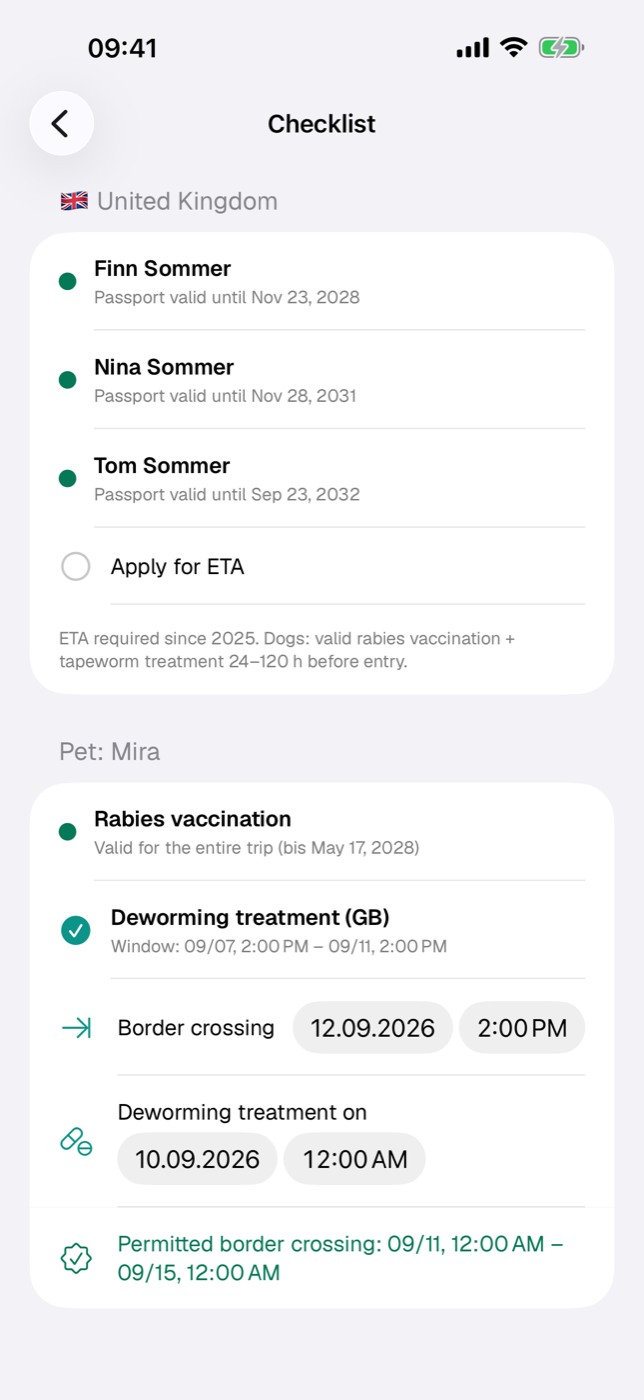
Every country has its own rules: national ID card or passport, ETA or visa, a rabies vaccination for the dog, a deworming treatment within a narrow time window. The checklist holds what you have stored in your country records against the participants of this trip and tells you what fits and what doesn’t.
You open it in the trip via the eye icon View sections and then Checklist. The To checklist button on the notes card of the trip overview also leads here.
22.1 What the checklist checks automatically#
The basis is the countries linked to the trip (Edit → section Countries). Without a linked country the page stays empty. The requirements come from the country records (Countries) — Etappe shows what is stored there and adds nothing from its own knowledge.
The layout is always the same: first one section per country (flag and name), then one section per pet. Per country, the following can appear:
| Row | appears when the country record contains |
|---|---|
| Status-light row per person | a required ID document |
| Apply for ETA | ETA required |
| Apply for visa | visa required |
| Observe quarantine regulations | quarantine |
| Recommended vaccinations | at least one vaccination recommendation |
| Free text | entry requirements |
If the trip has no start date, an orange note appears at the top: validity checks are then only partly possible because the comparison period is missing.
22.2 Documents per person and destination country#
If a country requires an ID document, every participating person gets a row with a status-light dot and a reason. To do this, Etappe looks through the person’s documents (People) for the matching types: for the requirement national ID card only national ID cards, for passport only passports, for “Both” both. Among the matches, the document with the latest validity counts; “Permanently valid” beats any date.
| Status light | Meaning |
|---|---|
| red | No matching document available |
| red | Document expired |
| red | Document expires during the trip |
| orange | Validity unknown (no “Valid until”, no Permanently valid checkmark) |
| green | valid until … or permanently valid |
The comparison is made against the end of the trip, failing that against the start of the trip. A passport that expires three days before the return journey is therefore red — not green.
Whether the first name or first and last name appears here is set under Names in checklists (All settings).
The minimum remaining validity that some countries additionally require (for example six months beyond entry) is not checked by the checklist but by the alerts engine — see 22.6 How the checklist and the alerts work together.
22.3 ETA and visa items#
If a country needs an electronic travel authorization or a visa, Apply for ETA or Apply for visa appears as an item you can check off. One tap on the row sets the checkmark, the date is saved with it, and the text is struck through. A second tap removes the checkmark.
These items apply to the trip and the country, not to individual people — they are a memory aid for the application. Whether the authorization is then in hand and valid long enough is something Etappe checks only once you add the document you received to the person as an ID document of type ETA or Visa, with “Valid until” or the “Permanently valid” checkmark.
22.4 Pet section: pet passport, rabies, deworming treatment#
A section per pet appears only if at least one destination country requires a rabies vaccination or prescribes a deworming treatment.
Rabies. The status light rates the animal’s vaccinations (Pets); it recognizes entries whose type contains “Rabies”, “Tollwut” or “Rage”.
| Status light | Reason |
|---|---|
| green | vaccination is effective at the start of the trip and is valid until the end of the trip |
| red | no rabies vaccination on file |
| red | expired or expires during the trip |
| red | the 21-day waiting period after the primary vaccination is still running at the start of the trip |
| orange | vaccinated only after the trip started |
| orange | validity unknown, vaccination details incomplete |
Without a trip period, instead of the status light there is only the note that the vaccination is required and the period is missing.
Deworming treatment. For every country with a deworming requirement there is a separate row with the calculated time window. The border crossing is taken as the most precise value known: a time you set yourself takes precedence over the arrival of the first journey whose destination is the deworming country, which in turn takes precedence over the start of the trip. Below the window, a small line says which value currently applies — such as “Border crossing 07/14 10:30 AM · from journey “Ferry Calais–Dover””, “· set manually” or “· trip start”. The window extends from “maximum hours before” to “minimum hours before” (if the country record has no entry: 24 to 120 hours).
If several countries with a deworming requirement are on the trip, the checklist points this out: only the first border crossing is taken into account — you check the other countries manually, for example with the deworming treatment calculator under More → Little helpers (Little helpers).
- Tap Set border crossing (leaving the EU) if you want to set the date and time of departure yourself. A small form opens, pre-filled with the automatically determined value. A border crossing you set stays put, even if journeys or trip dates change; Determine automatically (journey or trip start) returns to the calculated value.
- Check off the deworming treatment as soon as it has been given.
- Tap Deworming treatment on and enter the actual time.
- Below that, Etappe shows the resulting permitted border crossing as a period — green with a seal if your planned crossing falls within it, otherwise red with the note that it is outside the window.
Checkmark, treatment time and border crossing are saved per pet and trip. If several deworming countries are in the same trip, their rows therefore share the same entry.
Moving the trip, removing a pet. If you move the start of the trip in the trip form, Etappe asks whether a border crossing you set and the treatment time should move by the same number of days. If you remove a pet from the trip, Etappe discards its checkmarks and times for this trip — if it joins again later, its planning starts afresh.
Time zones. In a trip with time zones, all times are shown in the zone where they apply: the deworming window in the zone of the day, the border crossing in the zone of entry — for a journey, its destination zone. If a zone differs from your home time, the time carries a label. In the forms for the border crossing and Deworming treatment on, you choose the zone as well (Travelling across time zones).
The checked-off treatment time also feeds the notes Earliest and Latest border crossing in the Calendar and in Today — there it takes precedence over a vet appointment of the animal (Pets). A vet appointment only counts if it is at most 30 days before or 7 days after the border crossing; a “deworming” appointment from an earlier trip is thus left out.
Restricted breed. If a restricted breed is entered for a dog (Pets), Etappe checks every country the trip touches — the trip’s countries and the start and destination countries of all journeys. For each country with an entry ban for that breed there is a red row at the top of the section, for each country with restrictions an orange one, each with the breeds and the country’s note. The dog’s section then also appears when no trip country requires rabies or deworming.
22.5 Adding your own items and checking them off#
Exactly the items that result from the country data can be checked off: ETA, visa and deworming treatment. You don’t create free checklist items in the checklist — for that there are To-dos for tasks with a due date and Reminders for notifications at the right time.
Whatever is missing from the checklist, you add at the source: requirements and entry texts in the country (Countries), documents and vaccinations in the person or pet. The checklist picks up the change immediately.
22.6 How the checklist and the alerts work together#
The checklist is the working view of one trip, Alerts the inbox across all trips. Both use the same data but check different things. Only in Alerts appear:
- the minimum remaining validity of the passport on entry, if the country requires it,
- missing or expiring ETA/visa documents per participant,
- document expirations in general, vehicle documents and medication doses.
Only the checklist, on the other hand, shows the vaccination recommendations, the quarantine note and the entry requirements in plain text.
Two things are worth remembering: a checkmark at “Apply for ETA” doesn’t clear an alert — that takes the document on file. And the deworming alert reports as soon as the latest end of the window is at most 14 days away; from three days it becomes critical. If the planned border crossing lies outside the permitted window, it is critical immediately.