 Etappe
39. Your data#
A travel app knows a great deal: passport numbers, addresses, bookings, the dog’s vaccination dates, photos from the evening at the harbor. So it should be clear where that data is kept, when Etappe connects to the internet at all, and which permissions the app needs for what. This chapter answers those questions as precisely as it can.
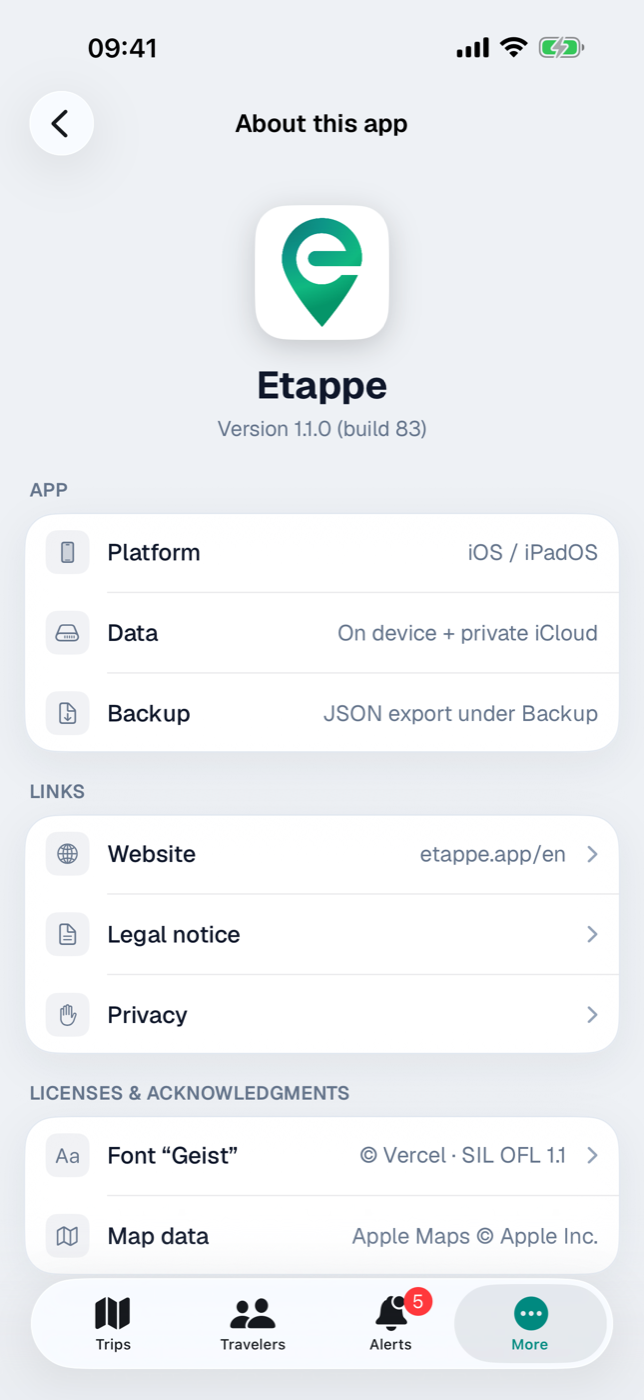
You meet the short version in the app as well: More → About this app simply says On device + private iCloud under “Data”.
39.1 What stays on the device#
Everything you enter is stored in the app’s database on your device: trips with all their sections, records for people, pets, vehicles and countries, journal entries, packing lists, budget items, reminders. Files come on top — photos, PDFs, ID scans, cover photos, imported GPX tracks and recorded routes (Documents and receipts, Storage and files).
Alongside that, a few small things live outside the database:
| What | Where | Note |
|---|---|---|
| Settings (appearance, route planner, name format, lock interval, perspective for country data) | the app’s settings store | stay local |
| Home country, home location, base currency, ECB rate table | the app’s settings store and, with iCloud, the key-value store of your Apple ID | travel between your devices; local without iCloud (Home) |
| App lock code | the device’s keychain | readable only while the device is unlocked, tied to the device |
| Trial start date | the device’s keychain | tied to the device, survives a reinstall |
| Preview files for documents and scans | temporary folder | readable only while the device is unlocked, cleared at the next app launch |
This data leaves your device only when you make it happen — through an export, a PDF, the share menu (Exports and printouts, Backup) — or via iCloud sync in your own iCloud space (iCloud sync). There it is stored encrypted, and Apple keeps the key. Etappe does not mark any fields as encrypted yet — so even the Advanced Data Protection setting of your Apple ID does not make it end-to-end encrypted throughout (iCloud sync, section 37.6).
39.2 Which connections the app makes (maps, country file, exchange rates, purchase)#
Etappe has no server of its own for your data. These are the only occasions on which the network is involved:
| Occasion | Counterpart | When |
|---|---|---|
| Displaying maps and place markers | Apple Maps | whenever a map is visible |
| Looking up a place’s time zone | Apple Maps | when, in a trip with time zones, you set a place on the map, by location or from a photo and Look up time zone online is on |
| Handing a destination to the route planner | Apple Maps or the app you chose | when you tap a place marker — in “Today”, on an accommodation, activity or research item, or on the map |
| Loading country records | etappe.app | only when you tap Import from etappe.app |
| Loading checked trips | etappe.app | only when you open Load from Etappe and tap Load trip |
| Loading exchange rates | frankfurter.dev (reference rates of the European Central Bank) | only when you tap Refresh Rates or once after a country import |
| Buying or restoring the full version | App Store | only in the purchase view |
| Syncing between your devices | your iCloud | continuously, while iCloud is on |
| Opening web links (website, legal notice, privacy policy, font license, redeem code, your own links) | your browser | when you tap them |
Five points deserve a closer look.
Maps. The map display comes from Apple; the line “Map data — Apple Maps © Apple Inc.” under About this app says as much. To show a map, the map sections you look at are fetched from Apple. If a route planner you have chosen cannot handle addresses, Etappe first resolves the address into coordinates — that also goes through Apple (Map, Today).
Time zones. If, in a trip with time zones, you set a place on the map, by location or from a photo, Etappe asks Apple Maps for the time zone of that spot — without a tap of your own, but only as long as Look up time zone online is switched on. The place’s coordinates are transmitted. The app says so under Legal: “If “Look up time zone online” is switched on, Etappe asks Apple Maps for a place’s time zone when you set it; the place’s coordinates are transmitted. Switched off or offline, the time zone comes from the country.” With the place search, Apple supplies the zone anyway (Travelling across time zones).
Country file. The import under Records → Countries fetches a file from etappe.app. The confirmation dialog spells it out: “The country list is loaded from etappe.app. The file is digitally signed — before importing, the app verifies with its built-in key that it is genuine and unchanged. Then you see a preview.” If the signature doesn’t match, Etappe stops and doesn’t process the file at all. It is a plain download; nothing about you is transmitted (Countries).
Exchange rates. The only service outside Apple and etappe.app that Etappe contacts. The app says it verbatim under Legal: “Etappe fetches exchange rates from frankfurter.dev (reference rates of the European Central Bank) — only when you tap ‘Refresh Rates’ or import countries. Nothing is transmitted beyond what every request technically requires (IP address); no data from the app.” The response is the ECB’s daily rates; Etappe stores them in the country records and in the key-value store. At app launch, in the background or on a schedule, Etappe loads nothing (Countries, section 6.8).
Purchase. Purchase, restore and redeemed codes go through the App Store and your Apple ID. All Etappe learns from that is whether the full version is unlocked — the app never sees payment details (Trial and full version).
39.3 Which permissions are needed for what#
iOS asks for each permission only when it is first needed — not at launch. The text in the dialog comes from the app and reads verbatim:
| Permission | Text in the dialog | Used for |
|---|---|---|
| Location (while using the app) | “For your current location in journal entries, map selection, and manual route recording.” | location in the journal, picking a location on the map, route recording |
| Camera | “To take photos for journal entries.” | taking a photo directly, for instance via the quick action |
| Face ID | “Unlock Etappe with Face ID.” | app lock |
On top of that come notifications: they are requested when you save your first reminder and serve the 9:00 AM reminders only (Reminders).
Two special cases are worth mentioning. For photos from your photo library, Etappe asks for no permission at all: selection goes through the system picker, which hands over only the pictures you marked — there is no access to the rest of the library. And route recording keeps going when you leave the app; iOS shows the familiar notice about location use (Recording a journey).
Every permission can be revoked again in the iOS Settings. Without location, no journey can be recorded, and the buttons for the current position have no effect; without the camera, the way via the photo library remains; without notifications, the reminders still sit in the app but don’t announce themselves. Everything else works unchanged.
39.4 No accounts, no tracking, no sharing#
Etappe requires no registration. There is no username, no password, no account and no profile in the app. Your Apple ID comes into play only where it is in charge anyway: for the purchase in the App Store and for iCloud sync — both between you and Apple, not through the app.
There are no analytics or advertising components, no usage statistics, no crash collection and no identifier that recognizes you. No third-party libraries are included; the only outside ingredient is the bundled font “Geist”, which loads nothing. Its license is under About this app. The only third-party service the app contacts is the rate service frankfurter.dev — and that only when you tap (section 39.2).
So, in one sentence: your travel data goes to no one unless you pass it on yourself — by export, PDF or share menu — or you use sync in your own iCloud.
You reach the legal notice and privacy policy directly from the app via More → About this app; they open in the browser. How to protect the app with a code on top is in App lock; the legal details and the contact are in Legal and contact.