 Etappe
8. Pets#
When an animal travels along, it comes with more paperwork than any person: microchip, EU pet passport, rabies vaccination, and for some countries a deworming treatment within a narrow time window. You set the animal up once, and Etappe works out the deadlines for every trip from that.
The area is called Travelers — in the tab bar on iPhone, in the sidebar on iPad. Below People you’ll find the Pets group there.
8.1 Adding a pet (species, breed, profile photo)#
- In the Travelers tab, tap New pet to the right of the Pets heading — or the tile with the plus sign in the same group.
- Choose photo takes a profile photo from your photo library; after that, Crop and Remove are available. Without a photo, Etappe shows a paw.
- Enter the Name. Without it, Save stays inactive.
- Choose Species (Dog, Cat, Other) and Sex (Not specified, Male, Female, Unknown); Breed is a free text field.
- Under Date of birth, switch on Set date of birth and choose Born on. Etappe derives the age in years from it.
- Save.
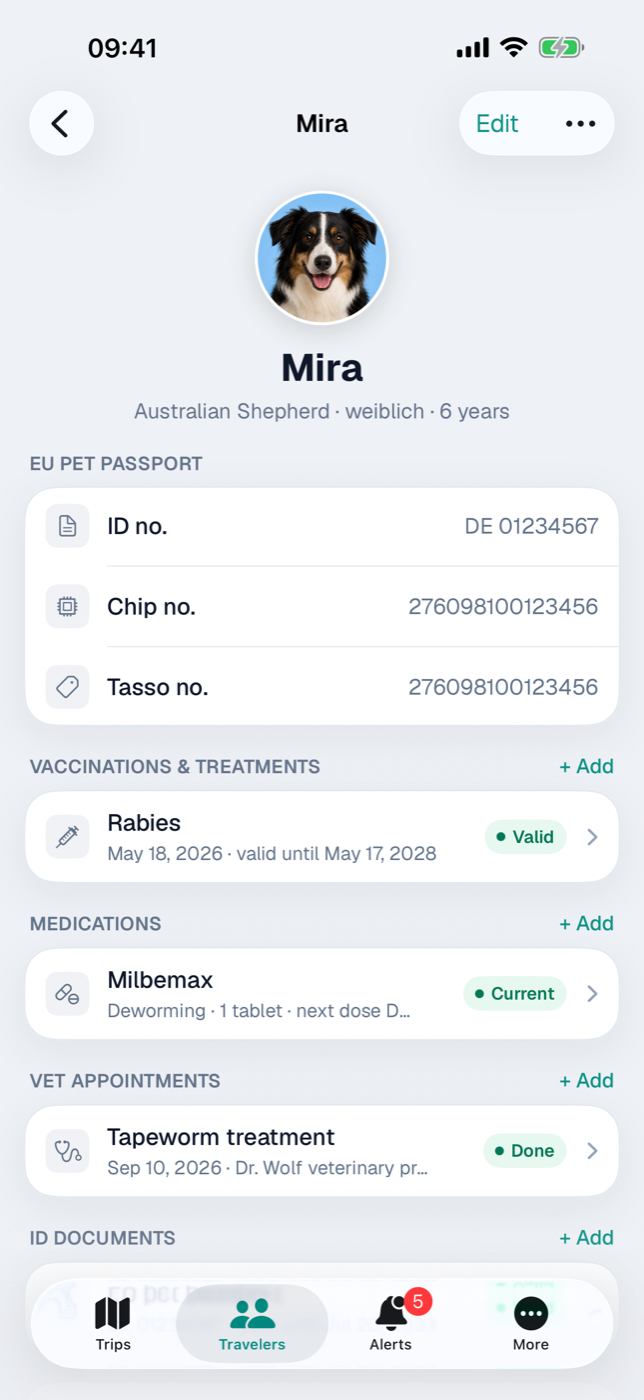
Below the name in the detail view you then see the breed — or the species, if there is no breed —, sex and age; you can change all of it via Edit.
For an animal to show up in a trip, you link it there: trip → Edit → Travel party section → Pets row. Only that enables the rabies and deworming treatment checks (Creating a trip).
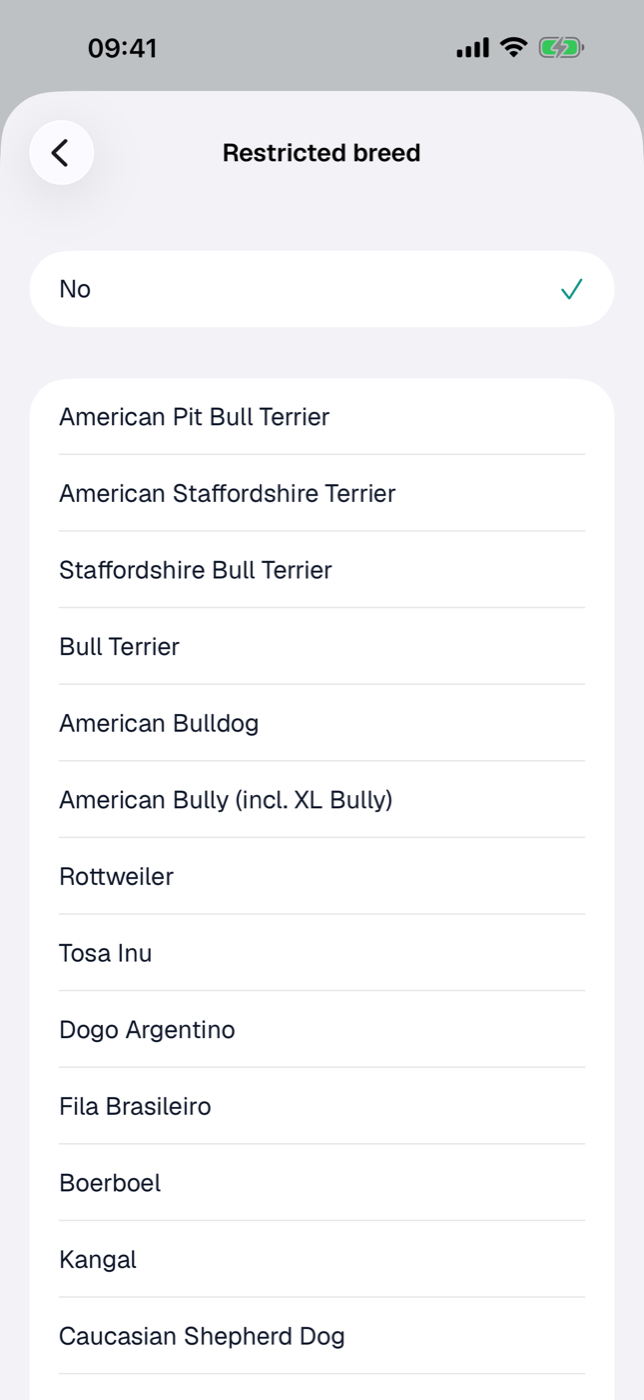
Restricted breed. For a dog, the form has a Restricted breed section. Under Restricted breed you choose whether your dog belongs to a breed that countries list as dangerous — such as American Staffordshire Terrier, Rottweiler or American Bully; for a cross, the breed it comes from. If it is none of these breeds, choose No at the top — nothing is preselected. Etappe checks this against the rules of every country on your trips, including countries a journey passes through: an entry ban appears as a critical warning, restrictions such as a muzzle or lead requirement as a notice (Entry checklist, Warnings). The rules come from the country data (Countries) and don’t replace information from the authorities — check them before you travel.
8.2 EU pet passport, chip and Tasso numbers#
The numbers go in the form under Documents: Chip number, EU pet passport no., Tasso no. and Tax number. Filled-in fields appear in the detail view as the EU pet passport card; empty ones Etappe hides.
You also add the passport itself as a document: + Add in the ID documents card. As Type, animals get EU pet passport (preselected), Pet passport, Vaccination record and Other; plus number, place of issue, Issued on, Valid until or Permanently valid, a photo and optionally a PDF file.
The row carries a status pill:
| Pill | Meaning |
|---|---|
| Permanently valid | “Permanently valid” checked |
| Valid | expires in more than 180 days |
| Expires soon | in 180 days or less |
| Invalid | expired — or neither a date nor the permanent checkmark |
Remember that last row: a document with no validity information counts as invalid in every check, not as unknown. Etappe also reports expiring ID documents in the Alerts.
8.3 Rabies vaccination and the validity status light#
You add vaccinations in the Vaccinations & treatments card. Any entry whose Type contains “Rabies”, “Tollwut” or “Rage” counts as a rabies vaccination; the suggestion button inserts “Rabies” directly. Both date fields matter: Vaccinated on and Valid until.
The check runs against the trip period, and only for trips with a country that requires rabies vaccination (Countries):
| Status light | Reason |
|---|---|
| green | vaccination is effective when the trip starts and is valid until the trip ends |
| red | no rabies vaccination on file |
| red | expired — or expires in the middle of the trip |
| red | the waiting period after the primary vaccination is still running when the trip starts |
| orange | vaccinated only after the trip started |
| orange | validity unknown or vaccination data incomplete |
Waiting period after the primary vaccination. A first rabies vaccination only counts for entry after 21 days (EU Regulation 576/2013). If the vaccination was given before the trip starts but less than 21 days before, the status light turns red and names the day from which the animal may enter. A booster given while the previous vaccination is still valid takes effect immediately — Etappe recognizes that from the dates on file. If the previous vaccination has already expired, the new one counts as a primary vaccination again, with a waiting period.
So green doesn’t mean “vaccinated at some point” but valid without a gap for the whole trip. The status light appears in the Entry checklist and on the Overview; red cases also at the top of the pet’s page and as a critical alert.
8.4 Deworming treatment: the time window before entry, setting the border crossing manually#
If a destination country requires a deworming treatment, it only counts within a time window before the border crossing. The hours are stored with the country; without a value of its own, Etappe uses 24 to 120 hours (the UK window). To try out dates, there is the Deworming treatment calculator under More → Little helpers (Little helpers): from a planned border crossing it works out the time window for the vet visit — or the other way round, from the vet appointment the permitted entry window.
The deworming treatment isn’t managed here but per trip in the Entry checklist: one row per pet and deworming country with the calculated window, the Deworming treatment (…) checkbox, the Deworming treatment on field and the Set border crossing (leaving the EU) button. The manually set border crossing, from date and time, replaces the trip start as the reference point — the normal case as soon as you know the ferry time.
Two alerts follow from this. On the pet itself they appear only when they are critical; in the window leading up to that, they show in the alerts inbox:
- Deadline approaching. Etappe alerts you when the end of the window is at most 14 days away; from three days on — and once it has passed — critical.
- Crossing outside the window. If the deworming treatment is checked off and its time entered, Etappe works backward to when you may enter with it. If the planned crossing falls outside that, the alert is critical immediately.
All of this applies per pet and trip, not globally.
Calendar and Today also show the permitted entry window after the deworming treatment as the notes Earliest and Latest border crossing — calculated from the deworming treatment checked off in the checklist, or failing that from a vet appointment recognizable as a deworming treatment (see 8.7 Vet appointments).
8.5 Other vaccinations and treatments#
The same card takes all other vaccinations. The suggestion button next to the Type field offers Rabies, Leptospirosis, Distemper, Hepatitis, Parvovirus, Kennel cough and Lyme disease for animals; free text works too. Add Practice / doctor, Vaccinated on, Valid until and notes.
The list is sorted by vaccination date, newest first. If there is a “Valid until”, the row shows the pill Valid, Expires soon (180 days or less) or Expired. Tap the row to change it; press and hold offers Delete.
8.6 Medications and the next dose#
Tick treatments, deworming, long-term medication go in the Medications card: Name, Purpose, Dosage and, via Plan next dose, the Due on field. This date produces the pill and the alert:
| Pill | next dose | Alert |
|---|---|---|
| Current | in more than 7 days | none |
| Due | in 7 days or less | Upcoming |
| Overdue | in the past | Critical |
Sorted by next dose; entries without a date go at the end. After a dose you set the date to the next one by hand — Etappe doesn’t advance it itself. Unlike rabies and the deworming treatment, medications aren’t tied to any trip: they always apply.
8.7 Vet appointments#
The Vet appointments card records vaccination appointments, check-ups and the deworming treatment dose: Date, optionally Set time, Type (say, vaccination or deworming treatment), Vet / practice, a lead time in days under Reminder, the Done switch and notes.
Sorted by date, latest appointment first. A completed appointment gets the green Done pill, an open one with a past date the red Overdue. If there is a lead time under Reminder, Etappe notifies you at 9:00 AM on the lead day — just like with Reminders. Completed appointments stay silent; without a lead time there is no notification.
The appointment itself doesn’t appear in the trip calendar — it usually falls before the trip. But an appointment whose Type contains “worm” (say, “Deworming treatment” or “Deworming”) supplies the deworming time for the Earliest and Latest border crossing notes in Calendar and Today (Calendar and day view) — provided it is at most 30 days before or 7 days after the trip’s border crossing.
If the pet travels on a trip with time zones, the form also offers the appointment’s Time zone below the time — for a deworming treatment at a vet in the United Kingdom, for example. Without a zone of its own, your home time applies (Travelling across time zones).
Invoices and findings go in the Documents card (Documents and receipts).
8.8 Archiving and deleting pets#
An animal that no longer travels with you, you archive via the tile’s context menu or in the detail view via More → Archive. The tile gets the Archived banner, fades and moves to the Archive group. An archived animal is no longer offered for new trips — but stays where it is already entered — and no longer triggers any alerts, whether for rabies, deworming treatment, medications or documents. Reactivate undoes that.
Delete … in the same menu removes the record for good. The dialog spells out what goes with it: documents, vaccinations, appointments and photo. In past trips the Name remains, so the travel party of the time stays complete. The same principle applies to people — see People.