 Etappe
48. Apple Watch#
On the road, a glance at your wrist is often enough: which trip day is it, what comes next, when does the ferry leave? The Etappe app for Apple Watch shows exactly that — for the current trip or, if none is running, for the next one. Editing still happens on the iPhone; the watch displays.
48.1 Setting it up#
The watch app comes with Etappe on the iPhone. If automatic app installation is on for your watch, it appears by itself; otherwise open the Watch app on the iPhone and tap Install next to Etappe under Available apps. watchOS 10 or later is required.
On first launch the watch shows Open Etappe on your iPhone: as soon as Etappe has been opened on the iPhone once, the trip arrives. If it says No trip planned, a trip with dates is missing — the watch does not show trips without dates or archived trips.
48.2 Today#
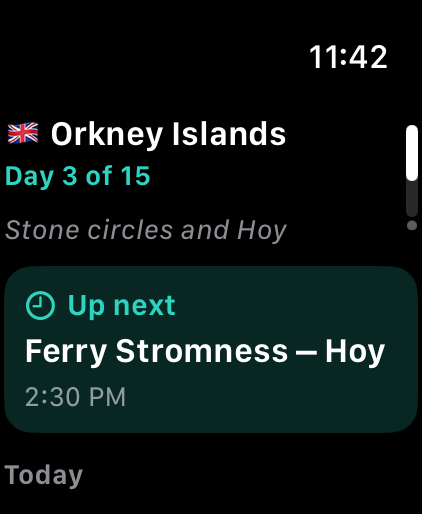
At the top you see the flag and title of the trip, below it Day 3 of 15 — before the start in 12 days. If you have given the day a theme (Today, Calendar), it appears below.
The highlighted Up next card shows the day’s next appointment with its time; if nothing is left for today, the first appointment of one of the following days with its weekday. Below follow all of today’s appointments: check-in and check-out, journeys, activities, sportives and — with a pet — the window for the border crossing. Times are in the trip’s local time (Trips across time zones); if it differs from your home time, At home it’s … appears at the bottom.
48.3 Calendar#
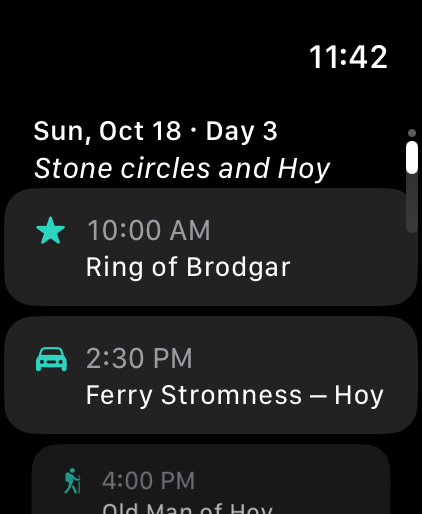
Turn the crown or swipe up to reach the second page: the coming days of the trip, each with date, trip day and theme, followed by the appointments. The watch receives the next two weeks; a day without appointments shows No entries.
48.4 How the data gets to the watch#
The iPhone sends the watch a small extract: title, countries, dates and the appointments of the coming days. It is sent again whenever you save something in Etappe and stays on the watch until a new one arrives — so the watch shows it even without a connection to the iPhone. It goes directly from the iPhone to the watch, without a server and without an account (Your data).
If a change does not arrive, briefly open Etappe on the iPhone; the watch then picks up the latest state the next time it starts.