 Etappe
32. Alerts#
An expired passport usually gets noticed exactly when it’s too late. The Alerts section turns that around: Etappe checks documents, vaccinations, deadlines and vehicle documents against the trips that are coming up or under way, and gathers everything that stands out in one place. On the iPhone that is the third tab, on the iPad an entry in the sidebar.
32.1 How alerts come about#
Alerts aren’t stored; they’re recalculated every time you open the list — there is no “Refresh” button. Enter a new “Valid until” date, and the alert is gone the next time you look.
Almost all rules refer to active trips. A trip counts as active when it meets all three conditions:
- Its status isn’t “Past”.
- It has a start date.
- Its end is today or later (if the end date is missing or lies before the start, the start day counts instead).
So trips without dates trigger nothing, and neither do completed ones — and archived people, pets and vehicles stay silent.
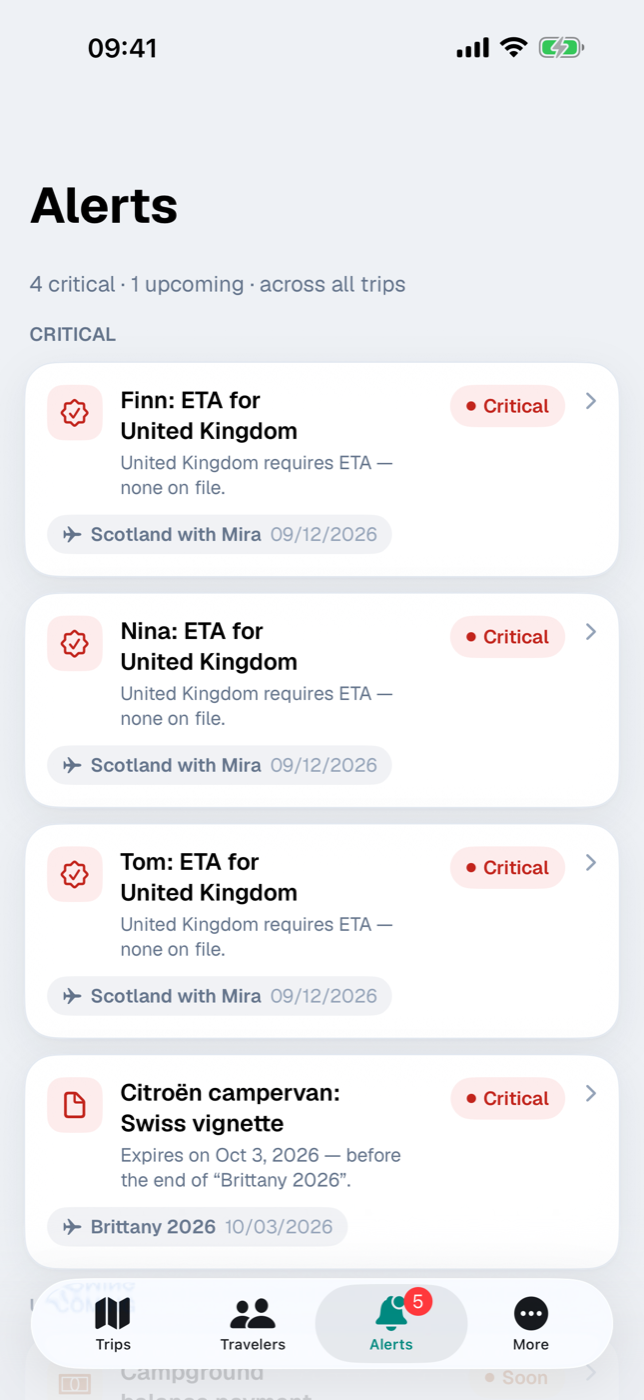
At the top there’s a line such as “3 critical · 5 upcoming · across all trips”. When nothing is open, it reads All clear. As long as your data is entirely empty — no trips, and no people, pets or vehicles either — it reads Nothing to check yet instead: once travelers and trips exist, Etappe warns you here about deadlines and expirations.
32.2 Critical and upcoming — the two levels#
Every alert has exactly one of two levels. The list is grouped accordingly: CRITICAL at the top, UPCOMING below it; within a group by date, entries without a date last.
| Level | Pill on the card | Meaning |
|---|---|---|
| critical | Critical | the deadline has passed or will run out before or during an active trip |
| upcoming | Soon | the deadline is approaching but isn’t critical yet |
Every card shows a symbol, a title, the reason with a date, and the level pill; if it belongs to a trip, a chip with the trip title and date follows below.
The badge on the Alerts tab counts both levels together, not just the critical ones. When nothing is open, the tab carries no number. The iPad sidebar shows the same number on the Alerts row.
32.3 Expiring ID documents, passports and driver’s licenses#
Checked are the ID documents of people and pets (People, Pets) that have a date in the Valid until field; without that date, a document never appears here. It enters the list when 180 days or less of validity remain — expired documents included, and permanently so.
| Situation | Level |
|---|---|
| expired | critical |
| expires before the end of an active trip with this person or pet | critical |
| expires in 180 days or less, no trip affected | upcoming |
If the validity runs out before the end of an active trip, the reason names the trip. For documents that have already expired, it only says “Expired on …” — the trip then appears solely in the chip below.
32.4 Minimum passport validity per destination country#
If a country has a minimum validity in months on file (Countries), Etappe adds those months to the start of the trip and compares.
The check runs per country of the trip and per non-archived participating person, using that person’s passport with the latest validity — national ID cards don’t count here. If the passport doesn’t last until the calculated cut-off date, there is an alert; it is always critical and names the country, the months required and both dates.
32.5 ETA and visa#
If ETA required or Visa required is set for a country, every participating person needs an ID document of type ETA or Visa respectively that is valid until the end of the trip. A checkmark at “Apply for ETA” isn’t enough — what counts is the document on file (Entry checklist).
This alert is always critical. Four cases trigger it: no matching document, an expired document, expiry before the end of the trip — or a document without a “Valid until” date and without the Permanently valid checkbox, whose validity therefore counts as unknown. A permanently valid document, on the other hand, always satisfies the requirement.
32.6 Vaccinations: what shows up here#
There is no separate alert rule for people’s vaccinations. A country’s vaccination recommendations are in the Entry checklist; whether a vaccination is expiring, you can see on the person’s profile. If you want to be reminded, create a reminder of type Vaccination (Reminders) — it shows up in this list via 32.10 Overdue reminders. The only vaccination with a rule of its own is the rabies vaccination of pets.
32.7 Rabies and the deworming treatment window#
Rabies. If an active trip has at least one country with a rabies vaccination requirement, the vaccination status of every pet on the trip is assessed over the trip period. Green triggers nothing, red becomes critical, orange becomes Soon; the reason is the same text as in the checklist.
Deworming treatment, not yet done. For every country with a deworming treatment requirement, Etappe calculates the time window before the border crossing (failing that, before the arrival of the first journey into that country, otherwise before the start of the trip) — one separate alert per trip, country and pet. If a trip has two countries with a deworming treatment requirement, two cards therefore appear in the list, each with the country code in its title. What counts in each case is the end of its own window:
| Days until the end of the window | Level |
|---|---|
| more than 14 | no alert |
| 4 to 14 | upcoming |
| 3 or less, including past | critical |
Deworming treatment done. Etappe then checks the other direction: if the planned border crossing falls outside the window that follows from the recorded treatment time, the alert is critical and names both times.
Restricted breeds. If a restricted breed is entered for a dog and a country on the trip — including a transit country of a journey — lists that breed, Etappe reports an entry ban as a critical warning and restrictions as an “upcoming” warning, each with the country’s note (Pets, Countries). This also applies to trips without dates, so a ban shows up while you are still planning.
32.8 Vehicle documents and vignettes#
Checked is every document of a non-archived vehicle with a “Valid until” date: Inspection, Registration, Insurance, Roadside assistance coverage, Emissions sticker, Vignette or Other (Vehicles).
| Situation | Level |
|---|---|
| expired | critical |
| expires before the end of an active trip with this vehicle | critical |
| expires in 60 days or less | upcoming |
32.9 Medication doses#
If you enter a Next dose for one of a pet’s medications, Etappe speaks up as soon as the date is 7 days or less away: until then as upcoming, from the day after the date as critical. This alert isn’t tied to any trip and appears without a trip chip.
32.10 Overdue reminders#
Open reminders have a due date and a lead time in days (Reminders).
- Due time passed: critical.
- Lead time begun — due day minus lead-time days —: Soon.
Completed reminders disappear immediately. The alert takes its symbol and trip reference from the reminder.
32.11 Balance payments for accommodations#
If an accommodation has a Due date for the balance (Accommodations, section 15.3), Etappe warns you about the balance payment — regardless of the trip dates, even for a trip without dates. The card is called “Balance payment: ‹accommodation›” and states the open amount and the due date.
| Days until due | Level |
|---|---|
| more than 14 | no alert |
| 4 to 14 | Soon |
| 3 or fewer, including past | critical |
There is no alert if Balance paid is turned on, the deposit already covers the total amount, the booking is set to “Discarded”, or the trip is archived or over.
32.12 Completing an alert or opening its cause#
Every alert card can be tapped — a small arrow on the right indicates it — and opens the view where the cause gets fixed. That is exactly where an alert is completed; it has no completed state of its own:
| Alert | Tapping opens | What to do |
|---|---|---|
| Document, minimum passport validity, ETA, visa | Detail of the person or pet | Add the document or fill in “Valid until” |
| Rabies | Checklist of the trip | Add the vaccination to the pet |
| Deworming treatment | Checklist of the trip | Check it off, set the time and the border crossing |
| Restricted breed | Trip checklist | change the trip or route, prepare for the restrictions |
| Vehicle document | Vehicle detail | Update the document |
| Medication | Pet detail | Set a new next dose |
| Reminder | Reminders list | Check it off |
| Balance payment | Accommodation detail | Turn on “Balance paid” or change the date (via Edit) |
The one exception: a document alert with no person and no pet assigned remains display only.
There is no “swiping away” an alert — it has no state of its own. If a deadline should stop concerning you for good, archive the person, pet or vehicle.